OPC UA
The OPC UA plugin provides two GInOut hardware types for exchanging a station’s GInOut data blocks via OPC UA:
OPC UA Server: Publishes the GInOut data blocks as variables in the OPC UA address space. External clients (PLC, SCADA, host system, …) use it to read and write the station’s data. This is the actual use case.
OPC UA Client: Connects to an external OPC UA server and keeps a local buffer up to date for each data block. It serves as a test/simulator counterpart to the server or to bind an existing OPC UA server.
Note
The plugin resides as a self-contained, removable folder <exe>\Plugins\OpcUaPlugin\ next to the application (plugin DLL, GInOutPlugin.xml and the bundled OPC UA stack of the OPC Foundation). Removing the folder removes the hardware type. Alternatively, the plugin can be provided per project under <project>\Plugins.
OPC UA Server
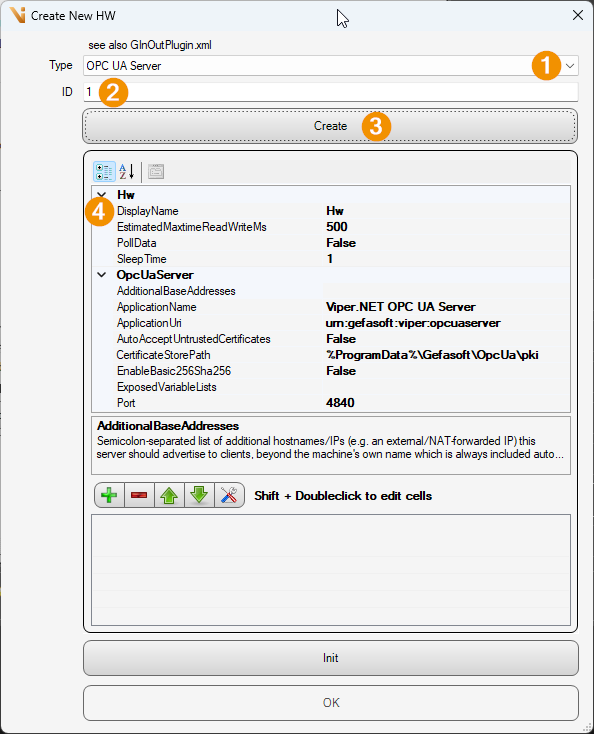
Type: OPC UA Server
ID: ID assigned
Create: Press button to generate object
DisplayName: Name control
The following parameters are available in the settings of the server hardware:
Port [Default
4840]: TCP port of the OPC UA endpoint.ApplicationName [Default
Viper.NET OPC UA Server]: Application name for the ApplicationDescription, the endpoint path and the certificate subject.ApplicationUri [Default
urn:gefasoft:viper:opcuaserver]: Application URI for the ApplicationDescription and the instance certificate.EnableBasic256Sha256 [Default
false]: Additionally offers the secure SecurityPolicy Basic256Sha256 (Sign & Encrypt). The unencrypted, anonymous endpoint (None) is always available. See Security / Certificates.AutoAcceptUntrustedCertificates [Default
false]: Automatically accepts client certificates instead of manually moving them from the rejected to the trusted store.CertificateStorePath [Default
%ProgramData%\Gefasoft\OpcUa\pki]: Root directory of the PKI store. Environment variables are resolved (e.g.%ProgramData%or%VIPER_PROJECT_DIR%).AdditionalBaseAddresses [Default empty]: Semicolon-separated list of additional hostnames/IPs that the server advertises to clients (e.g. an externally reachable NAT address). The computer’s own name is always added automatically.
ExposedVariableLists [Default empty]: Semicolon-separated names of GInOut variable lists whose variables are additionally exposed as named, typed nodes (see Address space). Empty = no variables. Changes take effect only after a restart of the server.
In addition, the properties dialog shows read-only status values: EndpointUrl (opc.tcp://localhost:<Port>/OpcUaServer), AdvertisedAlternateAddresses, SessionCount and IsRunning.
Address space
The server’s data block dialog is standard (ID, name, length); there are no protocol-specific additional fields. A variable in the address space is created from each data block:
Folder DataBlocks under Objects, namespace
urn:gefasoft:viper:opcuaserver.One ByteString variable per data block:
NodeId = numeric,
i=<DataBlockId>in the server namespace.BrowseName / DisplayName = name of the data block.
DataType =
ByteStringwith the length of the data block (in bytes).AccessLevel = read and write. A write access must supply exactly the defined length.
If list names are entered in ExposedVariableLists, an additional folder Variables with the structure Variables/<listName>/<variable> is created. There, each variable of the named lists is offered as a typed node (bool→Boolean, int→Int32, float→Float, double→Double, string→String, byte[]→ByteString, arrays as 1D array). These variables are merely a typed view of the same bytes that are already visible raw in the DataBlocks folder.
Note
The server does not start until the GInOutManager is initialized and has parsed the variable lists. Changes to the lists only take effect after a server restart.
OPC UA Client
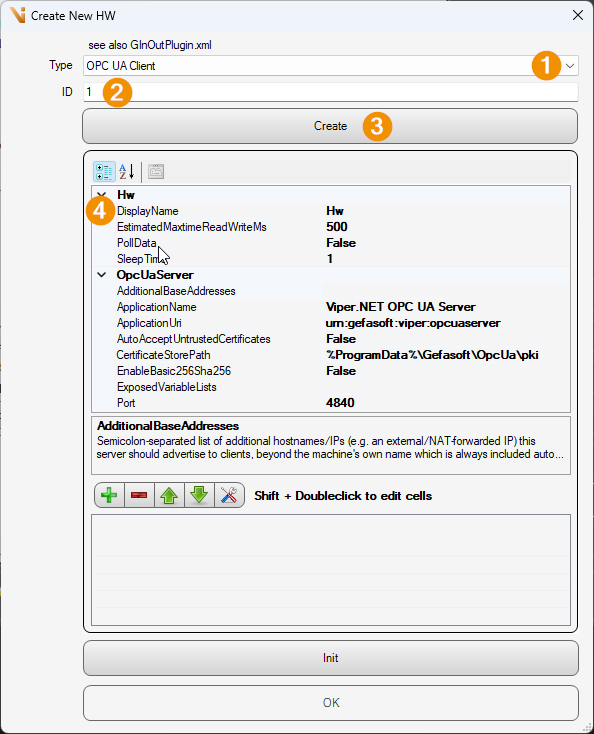
Type: OPC UA Client
ID: ID assigned
Create: Press button to generate object
DisplayName: Name control
The following parameters are available in the settings of the client hardware:
EndpointUrl [Default
opc.tcp://localhost:4840/OpcUaServer]: Endpoint URL of the OPC UA server to connect to.UseBasic256Sha256 [Default
false]: Uses the SecurityPolicy Basic256Sha256 instead of None.RemoteNamespaceUri [Default
urn:gefasoft:viper:opcuaserver]: Namespace URI that is resolved to the actual namespace index when connecting. The default NodeIds (i=<DataBlockId>) are derived from it, unless a data block has an explicit RemoteNodeId.ReconnectCycleTimeMs [Default
5000]: Time in [ms] between reconnect attempts while there is no connection.UseSubscription [Default
false]: Keeps the data blocks up to date via a real OPC UA subscription (server push) instead of polling. See the warning below.PollIntervalMs [Default
200]: Time in [ms] between the read cycles that keep the local buffer up to date whenUseSubscription=false.SubscriptionPublishingIntervalMs [Default
200]: PublishingInterval of the OPC UA subscription in [ms] (whenUseSubscription=true); deliberately separate from the poll interval.CertificateStorePath [Default
%ProgramData%\Gefasoft\OpcUa\pki_client]: Root directory of the client’s PKI store (environment variables are resolved).MirrorToVariableList [Default empty]: Name of a GInOut variable list into which server variables selected in the variable browser are mirrored as typed, data-block-less variables (kept in bidirectional sync). Empty = no mirroring. The list is created if required; the change takes effect on the next connection.
As read-only status values, the dialog shows IsConnected and LastError. The button OPC UA Mirror-Variablen aus Server-Browser… lets you set the target list and search the connected server for variables to be added or removed as mirror variables.
Data blocks
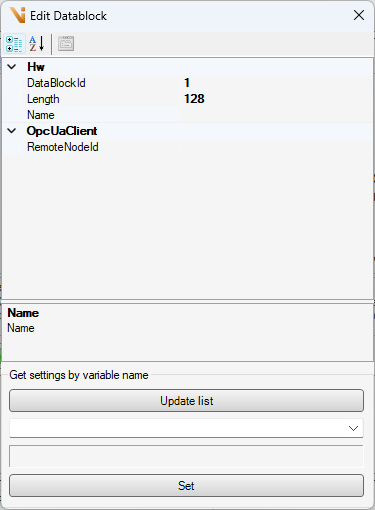
In addition to ID, name and length, the client’s data block dialog contains the field:
RemoteNodeId [Default empty]: Optional explicit NodeId on the server (e.g.
ns=2;i=123). Empty =i=<DataBlockId>in the namespace resolved from RemoteNamespaceUri is used (identical to the default scheme of the OPC UA server).
Using the dialog’s variable browser (Update list), the server’s address space is browsed; with Set, the NodeId and current byte length of the selected variable are applied to RemoteNodeId and Length.
Warning
UseSubscription: The subscription mode has triggered a server-side crash (BadServerHalted) against the bundled OPC UA server of this code base in the current SDK version. The default and recommended mode is polling (UseSubscription=false). Test the subscription mode carefully before productive use.
Security / Certificates
The CertificateStorePath points to the PKI root with the subfolders own / trusted / issuer / rejected. An instance certificate is created automatically on first start.
Default server:
%ProgramData%\Gefasoft\OpcUa\pkiDefault client:
%ProgramData%\Gefasoft\OpcUa\pki_client
The unencrypted, anonymous endpoint (None) is always available. For secure operation, set EnableBasic256Sha256=true on the server; it then additionally offers the encrypted endpoints (Sign & Encrypt). On the first secure connection attempt, the server places an unknown client certificate in the rejected store and rejects it. To trust the client, move its certificate from rejected\certs to trusted\certs; alternatively, AutoAcceptUntrustedCertificates=true accepts unknown certificates automatically (recommended only for test or closed networks).
Note
Only Anonymous is supported for authentication (optionally additionally secured via Basic256Sha256); there is no login with username/password.