TCP/UDP telegrams (TCPIPCONHW)
The TCP telegrams on datachange hardware (TYPE_ID TCPIPCONHW) exchanges GInOut data blocks with a peer via TCP or UDP. It uses the Gefasoft telegram protocol: when a data block changes, it is sent as a telegram; received telegrams are written into the local data blocks. The hardware can be operated as an active connection (client, connects to the peer) or as a passive connection (server, accepts connections). Optionally, a cyclic live telegram monitors the connection.
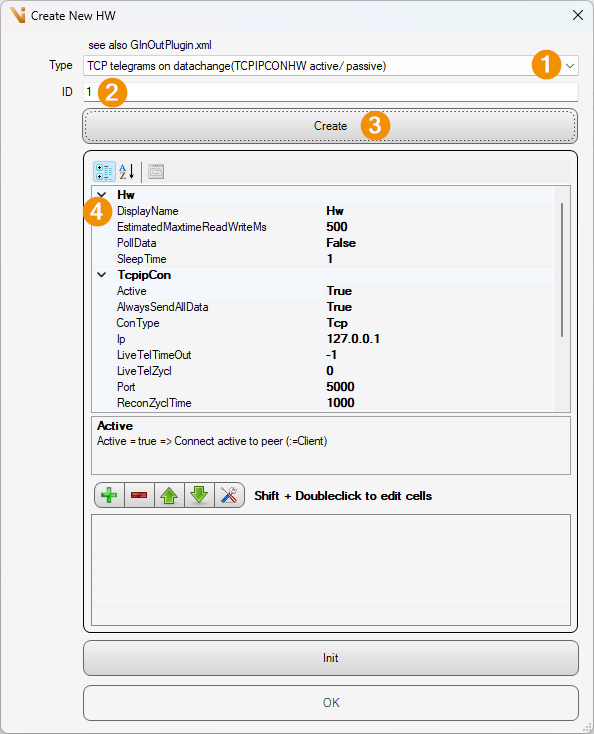
Type: TCP telegrams on datachange (TCPIPCONHW active/ passive)
ID: ID assigned
Create: Press button to generate object
DisplayName: Name control
The following parameters are available in the settings of the hardware:
ConType [Default
Tcp]: Connection type (TcporUdp). WithUdpthe hardware always behaves client-like (it sends via the client socket, regardless of Active).Active [Default
true]:true= active connection setup to the peer (client);false= passive, incoming connections are awaited on the Port (server).Ip [Default
127.0.0.1]: IP address of the peer (in client operation).Port [Default
5000]: Port.UdpLocalIp [Default empty]: Set to bind to a specific local network adapter with UDP.
UdpLocalPort [Default
-1]: Local UDP port; values<= 0use the value from Port.ReconZyclTime [Default
1000]: Reconnect cycle time in [ms].TimeoutWaitTel [Default
500]: Timeout while waiting for a telegram.LiveTelZycl [Default
0]: Cycle time of the live telegram in [ms]; values> 0start a sender thread that cyclically sends a live telegram.LiveTelTimeOut [Default
-1]: If no live telegram is received within this time span [ms], the status changes to disconnected (-1= monitoring off).TwistBytesInHeader [Default
true]: Swaps the byte order (endianness) in the telegram header.AlwaysSendAllData [Default
true]: Always sends the entire data block, even if only part of the data has changed.SendBufferSize [Default
0]: Size of the TCP send buffer.SendTimeout [Default
2500]: Timeout for the TCP send in [ms].
Data blocks
In addition to ID, name and length, the data block dialog contains two additional fields (columns id, name, direction, length [byte], sendOnConnect):
Dir [Default
inout]: Direction of the data block (in,outorinout).SendOnConnect [Default
true]: Sends the current data of this data block immediately after the (re)connection.