StreamTelLogger Plugin
The StreamTelLogger plugin receives messages from PLCs (or other third-party systems) over Viper streams and writes them via dedicated log4net loggers to separate log files — separate from the Viper log file, but in the familiar format and with the known rolling mechanism.
How it works
The plugin runs its own ConStreamTelPool (independent of the system’s global stream pool). Each stream of the pool can be mapped to a named log4net logger (“stream-tel-logger”); every received telegram is written through this logger. The loggers are attached to their own appenders with additivity=false — the Viper log file remains untouched.
Reception uses the existing stream infrastructure (UDP/TCP/COM): port, bind, reconnect etc. are configured as usual via the stream parameters; there is no separate socket code. For the PLC case: create a UDP stream and configure the local port — the stream then receives datagrams from any sender.
Activation
The plugin is opt-in: it is only loaded if it is activated in the project configuration (plugin “Stream-telegram-logger”, GUID 3CA6902A-5C1B-477E-BB24-C85E809609A4). Existing projects without activation behave unchanged.
Files & locations
All configuration files are located under <ViperData>\StreamTelLoggerPlugin\ and are created with defaults on first start:
File |
Content |
|---|---|
|
the plugin’s own stream pool (connections) |
|
loggers/appenders of the PLC logs (watched, changes take effect immediately) |
|
mappings stream → logger → encoding → PrefixTelId → PrefixLogLevel → SendResponse |
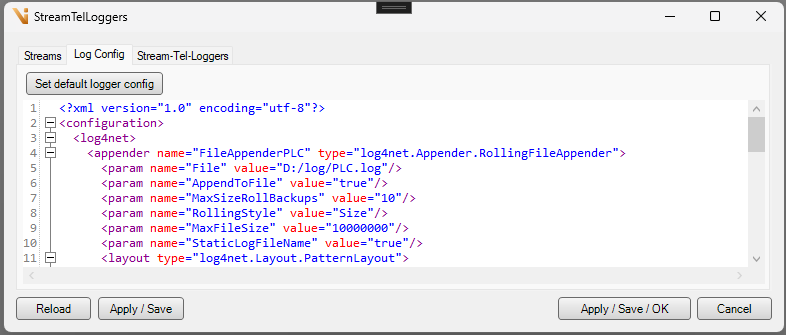
The default log4net config defines the logger “PLC”: a RollingFileAppender to D:/log/PLC.log (10 MB, 10 roll backups) plus a GBufferAppender (separate tab “PLC” in the Viper log viewer, dump to D:/log/PLC_Dump.log). Further loggers and appenders can be added to the config and used in the mappings.
The log4net config is loaded additively to the system’s main config; the reference to the main config remains unchanged (the log editor and ResetConfiguration of the shell keep working on the main config).
Message format
Encoding is configurable per mapping (ASCII, UTF8, Unicode, ISO-8859-x, …); default
WesternEuropean_8_Bit(ISO-8859-1). Agree on it with the PLC side.Trim:
\0,\r,\n,\t, spaces and the delimiter character of the stream protocol are removed at both ends of the message.PrefixTelId (per mapping, default off): if the message starts with a telegram id followed by
|(e.g.123|D:message), the id is split off before further processing. It is not logged, but only prepended to the response telegram (see Response telegrams). If the message contains no|, it is processed unchanged.PrefixLogLevel (per mapping, default off): if the message (after splitting off a telegram id) starts with
D:/I:/W:/E:/F:, it is logged with level Debug / Info / Warn / Error / Fatal and the prefix is removed. Without a known prefix (or with the feature disabled) the message is logged unchanged with level Info.
Response telegrams
With SendResponse (per mapping, default off) the plugin acknowledges every received telegram with a response telegram over the same stream:
ACK— the message was loggedWARNING:<text>— the message was not logged (no logger assigned, or the log level is disabled for this logger in the log4net config)ERROR:<text>— an error occurred during processing
If PrefixTelId is active and the message contained a telegram id, it is prepended to the response, e.g. 123|ACK. The response is encoded with the mapping’s encoding; with a delimiter protocol the delimiter character is appended.
Note
Responses are only sent for streams with a delimiter protocol (ConProtDel) or without a protocol (ConProtNone). With other protocols SendResponse has no effect; a warning is written to the Viper log when the stream starts. If sending a response fails, an error is written to the Viper log.
Operation
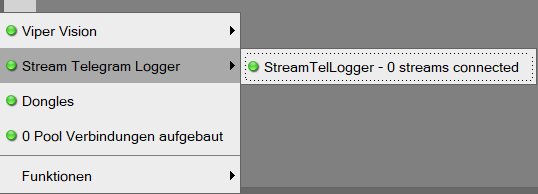
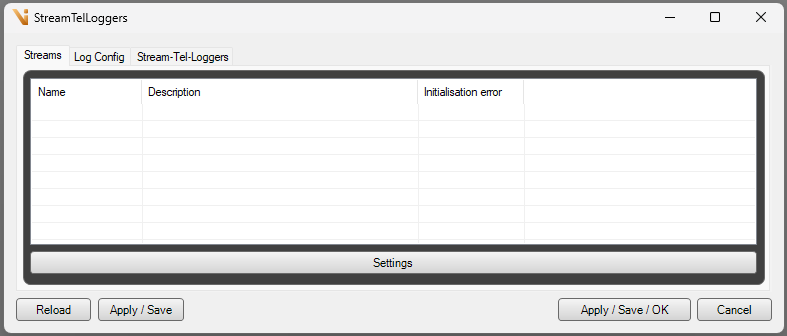
The state-menu entry shows the connection status of the plugin streams (if “Add to state menu” is enabled on the pool). A click opens — protected by the operation StreamTelLogger.EditParams — the parameter dialog with three tabs:
Streams — management of the plugin’s own stream pool
Log Config — XML editor of the log4net config with a default button
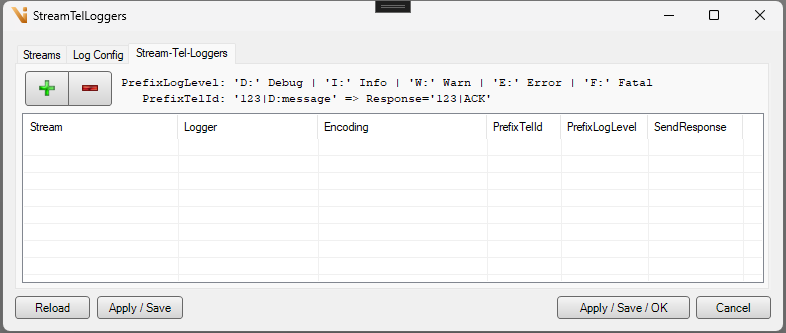
Stream-Tel-Loggers — the mapping list (stream → logger → encoding → PrefixTelId → PrefixLogLevel → SendResponse); when closing with unsaved changes the dialog asks for confirmation (“Apply changes?”)
Permissions
When a system is upgraded across version 8.0.4, StreamTelLogger.EditParams is granted automatically to the default roles Admin and Service — provided these roles exist and the plugin is already activated at that time. In all other cases (project-specific role model, later activation) assign the permission manually in the role model.
Error behaviour
Start-up error of a stream (e.g. port already in use): warning in the Viper log, Viper continues to run normally.
Processing error of a telegram (encoding, unexpected content): error entry in the PLC log file, deliberately in the temporal context of the affected messages.
Note
A UDP port can only be bound by one process. Once the plugin opens the port, no other program (e.g. an earlier Python receiver script of the PLC colleagues) may listen on the same port — replace it or move it to another port.