Gefasoft Lucon 4C-20A-V
The Lucon 4C-20A-V is a LUCON hardware variant controlled exclusively via Ethernet/UDP (using the Gefasoft.Lucon4C20AV SDK). It supports a large number of channels (up to 96 lighting channels) with separate current limiting for continuous and pulse operation. The maximum current per channel is configurable (default 3000 mA).
Note
Unlike the Lucon2, the Lucon 4C-20A-V offers no RS232 connection (only UDP or simulation) and has an additional status/diagnostics area per channel.
Controller settings
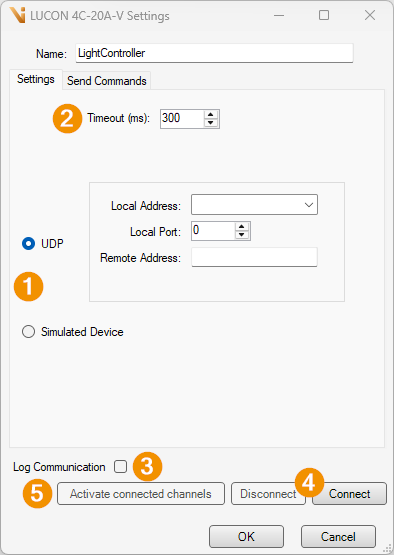
Connection mode
UDP: Connection via Ethernet/UDP (default). Remote Address (must be set), Local Address and Local Port can be set.
Simulated Device: Simulation mode without hardware.
Timeout (ms) [Default
300]: Maximum waiting time for a response from the device.Log Communication: Logs the communication with the device in the log.
Connect / Disconnect: Establish or close the connection.
Activate connected channels: Activates the connected channels.
Send Command
On the Send Commands tab, commands can be sent directly to the device (for diagnostic purposes).
Light channel settings
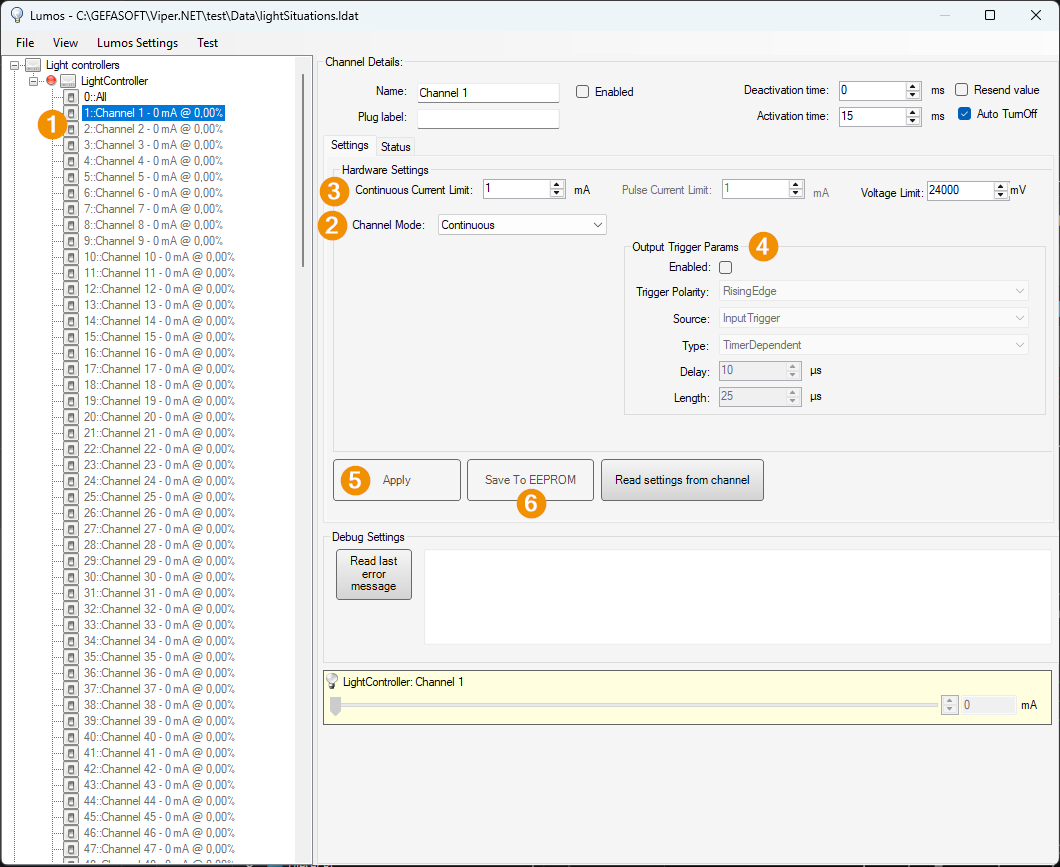
Address: Address of the light channel [1..96].
Channel Mode (operation mode)
Idle: Channel off.
Continuous: Channel in continuous operation.
Switch: Switch mode. The lighting is switched on and off via the input.
Pulse: Trigger mode. The lighting is pulsed via the input.
Channel parameters
Continuous Current Limit [mA]: Maximum current in continuous operation.
Pulse Current Limit [mA]: Maximum current in pulse/switch operation.
Voltage Limit [mV, default
24000]: Maximum output voltage. To prevent overheating, adjust the voltage to the connected lighting.
Output-Trigger: Parameters for the output trigger (Enabled, Polarity, Source, Type, Delay [µs, default 10], Length [µs, default 25]).
Apply: Apply settings and send to the device.
Save To EEPROM: Save current settings permanently in the device.
In addition, a Status tab shows diagnostic values per channel (including temperature, supply voltage, desired/actual current, voltage over the lighting, last pulse voltage/current).